

Mario Kart PC Forum - Advanced search
Results 261-280 out of 420+

MKPC News : Showcase your projects, keep us informed about your projects and more !
 843 -
843 - 
 156816 pts ★
  14942 pts ★ Champion
On 2023-08-09 at 20:34:09
So I plan on adding a BCP(Booster Course Pass)to Super Yoshi Kart Ultra.
It will have Retro tracks from every MK game (No MKT), But if I add MKT these 2 would be.
Sky-High Sundae
Squeaky Clean Sprint
EDIT Lakeside Park Map X)
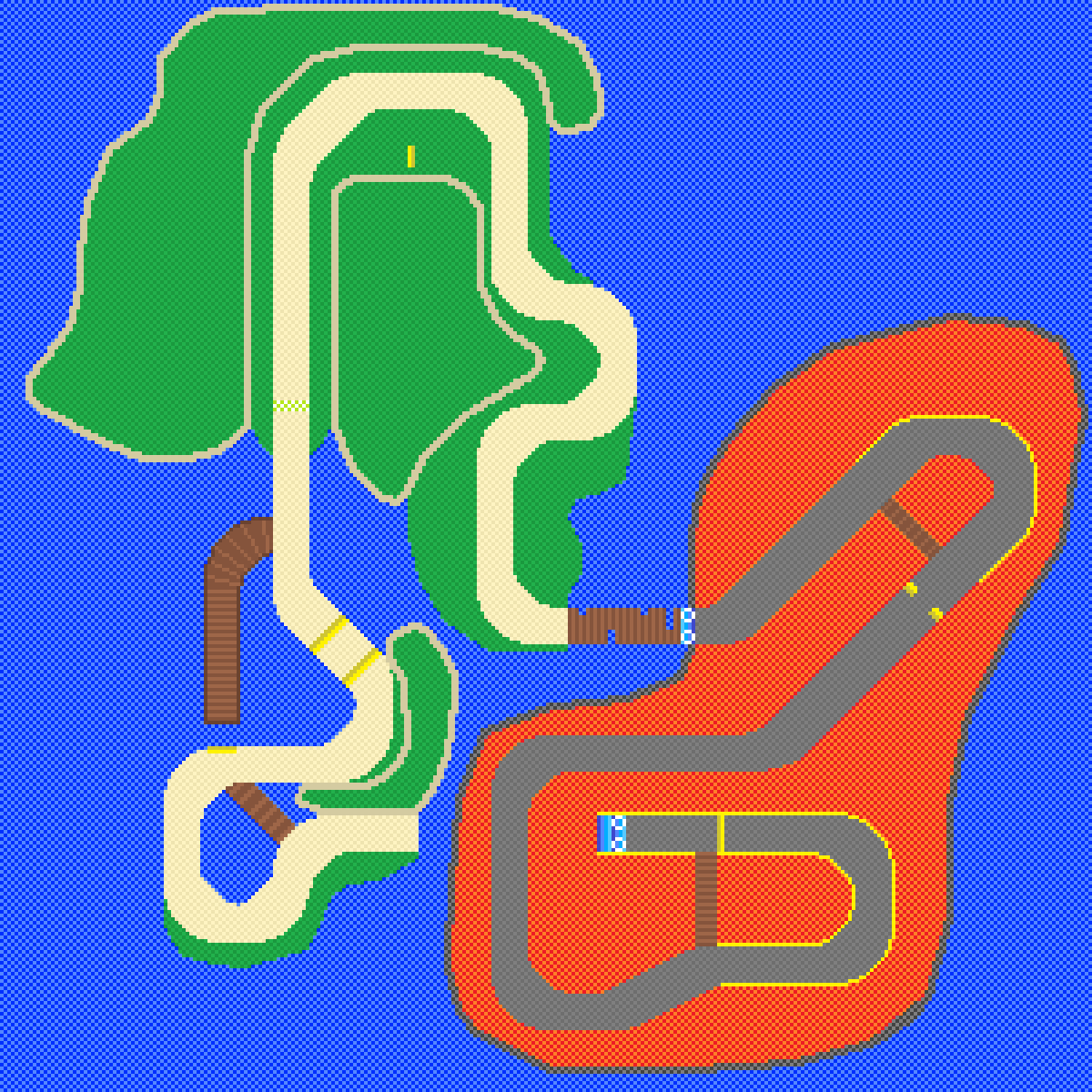
It will have Retro tracks from every MK game (No MKT), But if I add MKT these 2 would be.
Sky-High Sundae
Squeaky Clean Sprint
EDIT Lakeside Park Map X)
That looks sick! Hyped to test yout BCP Tracks!
Best/Worst Mario Power Up
On 2025-04-30 at 19:36:11
Mario Bros Games:
Best: Mega Mushroom
Worst: Mushroom
Mario Kart Games:
Best: Bullet Bill
Worst: Coin
Best: Mega Mushroom
Worst: Mushroom
Mario Kart Games:
Best: Bullet Bill
Worst: Coin
 1
1school rules
On 2023-10-29 at 04:22:01
Depends on the individual school tbh, every school needs rules or I'll just be Princess in the middle of all the Anarchy lol. But some schools have absolutely batshit rules, according to some teachers I'm breaking the rules cause I'm transgender 
Stay who you are, you're not breaking any rules. Those teachers just can not understand that even thought you are Transgender, you are still human like everyone else.So just ignore everything that they negatively say about you.
Always remember that there are lots of people like you and lots of people who support you.
 2
2 1
1 1
1On 2023-10-29 at 03:50:36
school rules are werd
I know some HORRIBLE SCHOOL RULES!
Have a look here:

(Btw anyone knows from what that image comes from?)
Is that image from bald man's simples?
On 2023-10-28 at 21:57:03
school rules are werd
I know some HORRIBLE SCHOOL RULES!
Have a look here:
(Btw anyone knows from what that image comes from?)
 32
32What do you use to make your complete tracks?
On 2025-05-16 at 17:32:30
What do you guys use to make complete tracks? I use canva
Paint.net is a great software.You can see the results on my tracks, @wqterbt's tracks or @TheNudgyHampter's tracks for example.
There are many other creators like @-iz-, @Coolioaziz, @FoxgirlThing and @Invu that also make great tracks with this software. Go check them out!!
 321
321Play chess against me!
On 2025-05-15 at 13:18:59
Just play here https://www.chess.com/
Brother this topic is 2 months old and these people haven't logged on in a while.
ASMR
On 2025-05-14 at 19:16:05
Do you like litsen ASMR?
You keep saying that everyone's topics are useless/pointless but I can say the same thing for your topic here. 2
2 1
1I Am Smart
On 2025-05-04 at 19:48:12
Good Job! What were some of the questions?
3! = 6Hellllllllllllllllllllo
On 2025-04-28 at 17:28:26
Hello
Hello new guy and welcome to Mario Kart PC! Hope you enjoy your time here! ^^An announcement...
On 2025-04-24 at 07:07:58
NOOOOO!!! N-NUDGYYY!!!
You... YOU DID THIS!! ARE YOU ALL HAPPY NOW??
*Growls angry*
I WILL make you PAY for this... I AM GOING TO HACK MKPC. SAY GOODBYE TO YOUR PRECIOUS FORUMS. I AM DELETING IN 4 DAYS.
You... YOU DID THIS!! ARE YOU ALL HAPPY NOW??
*Growls angry*
I WILL make you PAY for this... I AM GOING TO HACK MKPC. SAY GOODBYE TO YOUR PRECIOUS FORUMS. I AM DELETING IN 4 DAYS.
Seriously? Hack Discord, fer cryin' out loud. Also, Seeya, Nudge
Who invented Reverse drifting?
On 2025-04-24 at 15:30:17
Really depends on how you define it.
Hgt was the first to discover that you could hold reverse during an MT to turn tighter, and we used it on DS BC since 2020
JPG realised that you could use it on straights over a year later, and then Ahmad used it to chain SMTs. Team effort really
But Wargor made the game. He was the one to unintentionally invent this technique.Hgt was the first to discover that you could hold reverse during an MT to turn tighter, and we used it on DS BC since 2020
JPG realised that you could use it on straights over a year later, and then Ahmad used it to chain SMTs. Team effort really
 11
11Interesting information meme topic (fun facts but British and eligent)
On 2025-04-20 at 12:40:14
Bo'le o' wa'er
 2522
2522How do you make complete mode tracks?
On 2025-04-23 at 10:58:28
I personally use Paint.net to make tracks. The result is absolutely amazing!
Some other members use firealpaca too which is really great for drawing tracks.
Some other members use firealpaca too which is really great for drawing tracks.
2Track Creator 101 (Kinda Useless or Kinda Usefull advices, recomendations and stuff that you can add in your tracks)
On 2025-04-16 at 08:31:26
First of all... Happy New Year qlonas :gamba:, second yep its been a while but lets say that i forget for a while that i did this topic lmao... now yep lets go
My favorite part of making tracks, texturing helps to define the idea that you have for any part of the track, making clear the kind of texture that the element has, obviously not everything will have the same texture and blah blah blah lets go to the point, today i'm gonna show some ways that i use for do textures
A- Using Confetti + Fragment Blur effect:
The first way that i learned to do textures, even if its a bit outdated, i still using it sometimes and it works really good when you learn how to use it correctly. So let me explain step by step how to do it.
1- Selecting the part where you'll apply the texture, easily you can use the magic wand tool and select it doing click on the zone.
Extra: if you need to select multiples zones you can selec the "add" section and each click that you just keep pressed control when you click.
2- Create a new layer WITHOUT end the selection btw.
3- Pick the base color of the place where you'll add the texture and pick as secondary color a darker tone of that one
4- Pick the paint bucket tool, pick "Confetti" and fill the zone with that.
5- Go to effects > Blurs > Fragment.
6- Set the distance and frames as your preference and apply the fragment effect.
7- Click on the base layer and make the zones darker.
8- Now you can finally end the selection.
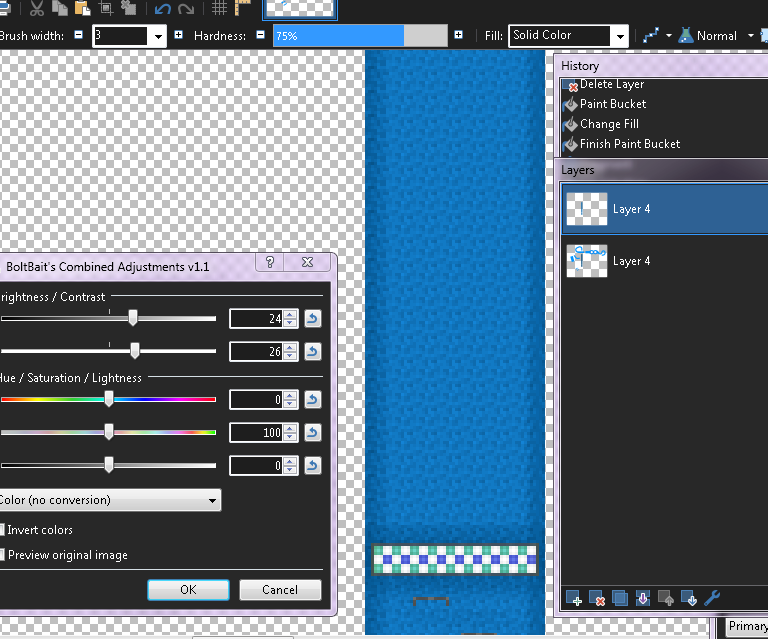
Extra: to highlight the details in the texture, you can apply light and constract settings as you can see here:
B- Using a Tileset or Already Existing Textures.
Probably the easier way to do textures in my opinion, because you just need a texture pattern so here we go.
1- Pick the tile that you would like to use. Make sure that the image repeats the pattern appropriately.
2- Add a new layer
3- In that layer, copy and paste the tile until you have a square (or something similar to a square) that covers the whole part where the texture will be placed.
4- Go back to the first layer, and with magic wand tool select the part where the texture will be placed.
5- Now go back to the texture's layer and invert the selection (you can use CTRL + I or just looking for the option)
6- Cut that selection using CTRL + X (you can also delete it with eraser tool but with cutting it is a shortcut basically lol)
7- Flatten and enjoy :gamba:
Extra: Again, to highlight the details in the texture, you can apply light and constract settings just like in the past method.
Extra II: after you cut the excedent on the texture, you can make that texture gray (just go to adjustments and pick black & withe), go to layer settings and pick overlay blend to get the color that you already have in your track
C- Do it by yourself
The most complicated now we're on the hardest way to do textures and its basically doing them by yourself, there's no much that i could explain because i rarely do a whole track doing textures by myself such as these kind of tiles:
As you can guess... is a headache but it worths.... sometimes
Said that, for another day i'll explain some basic stuff about lightning and shadows and how to do them (a least on my way)so cya fellas.
Happy New Year!Textures & Shading
My favorite part of making tracks, texturing helps to define the idea that you have for any part of the track, making clear the kind of texture that the element has, obviously not everything will have the same texture and blah blah blah lets go to the point, today i'm gonna show some ways that i use for do textures
A- Using Confetti + Fragment Blur effect:
The first way that i learned to do textures, even if its a bit outdated, i still using it sometimes and it works really good when you learn how to use it correctly. So let me explain step by step how to do it.
1- Selecting the part where you'll apply the texture, easily you can use the magic wand tool and select it doing click on the zone.
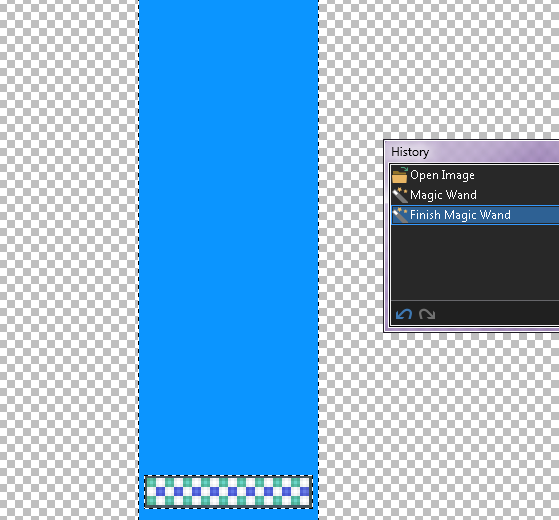
Extra: if you need to select multiples zones you can selec the "add" section and each click that you just keep pressed control when you click.
2- Create a new layer WITHOUT end the selection btw.
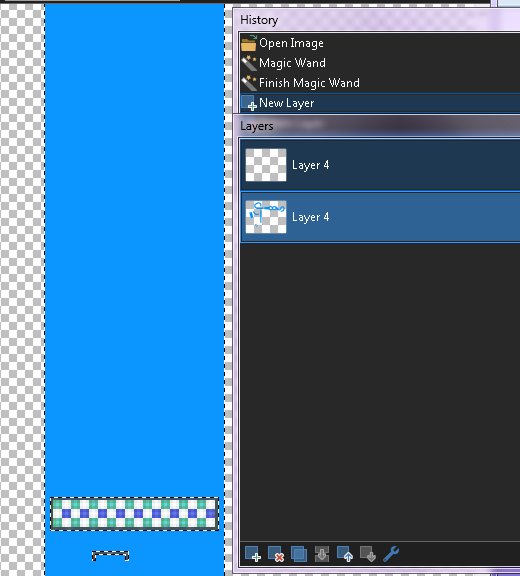
3- Pick the base color of the place where you'll add the texture and pick as secondary color a darker tone of that one
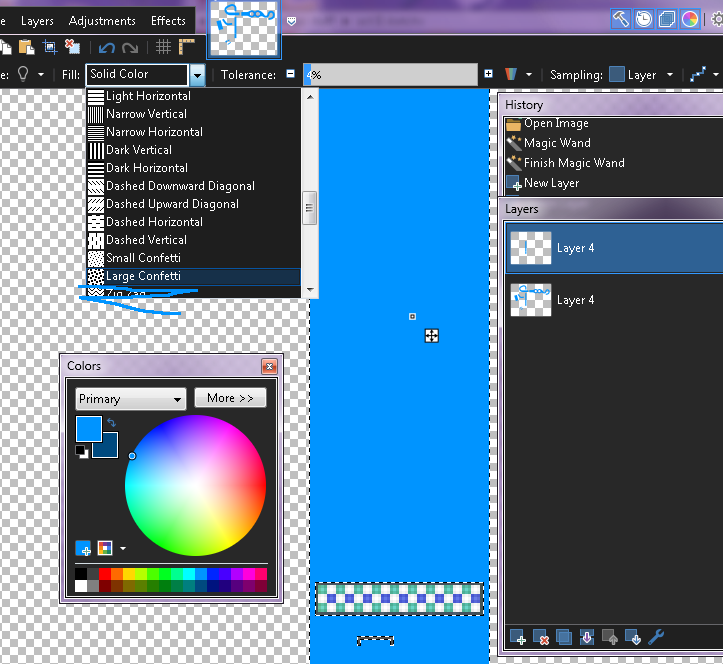
4- Pick the paint bucket tool, pick "Confetti" and fill the zone with that.
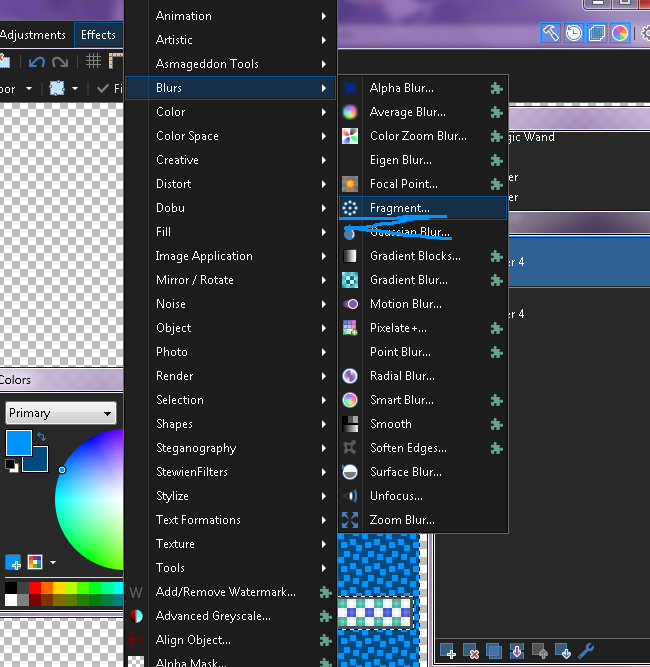
5- Go to effects > Blurs > Fragment.
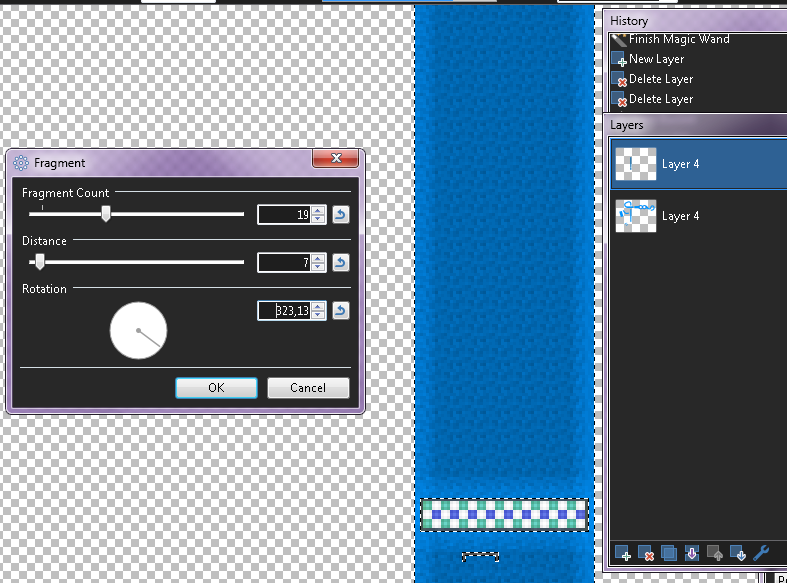
6- Set the distance and frames as your preference and apply the fragment effect.
7- Click on the base layer and make the zones darker.
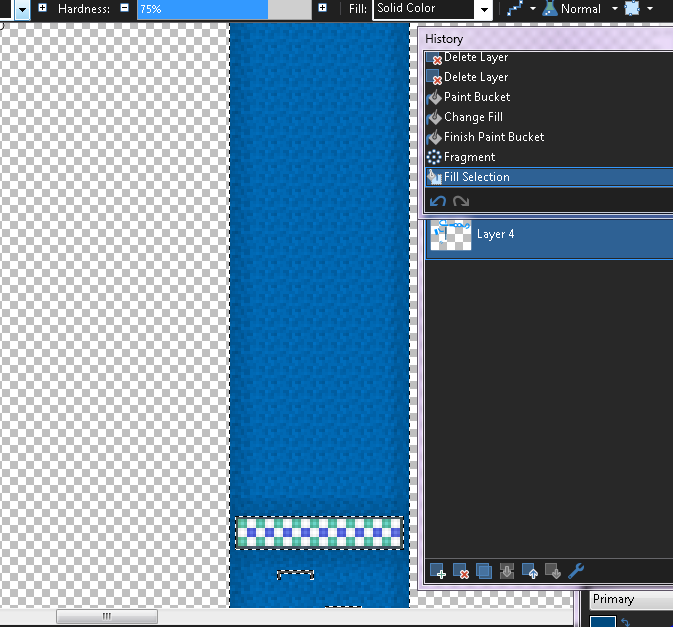
8- Now you can finally end the selection.
Extra: to highlight the details in the texture, you can apply light and constract settings as you can see here:
B- Using a Tileset or Already Existing Textures.
Probably the easier way to do textures in my opinion, because you just need a texture pattern so here we go.
1- Pick the tile that you would like to use. Make sure that the image repeats the pattern appropriately.
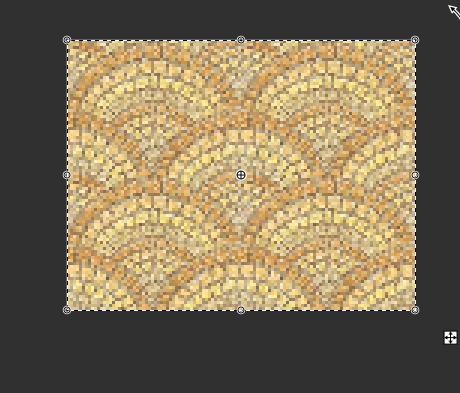
2- Add a new layer
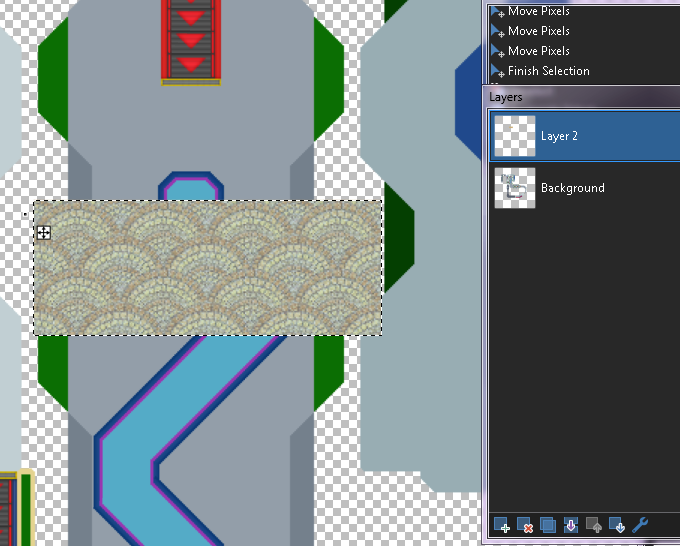
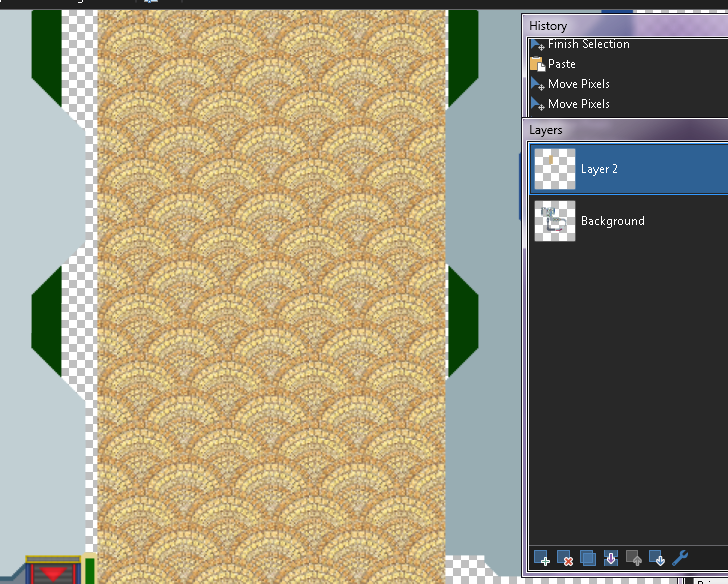
3- In that layer, copy and paste the tile until you have a square (or something similar to a square) that covers the whole part where the texture will be placed.
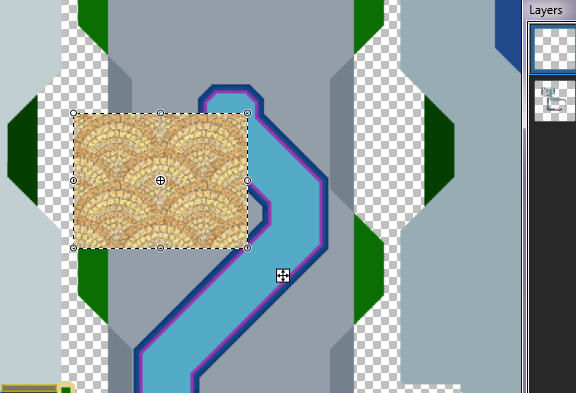
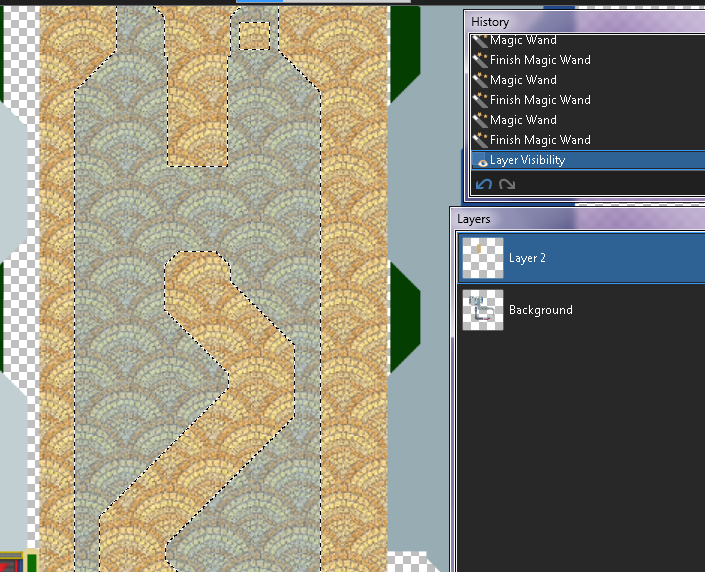
4- Go back to the first layer, and with magic wand tool select the part where the texture will be placed.
5- Now go back to the texture's layer and invert the selection (you can use CTRL + I or just looking for the option)
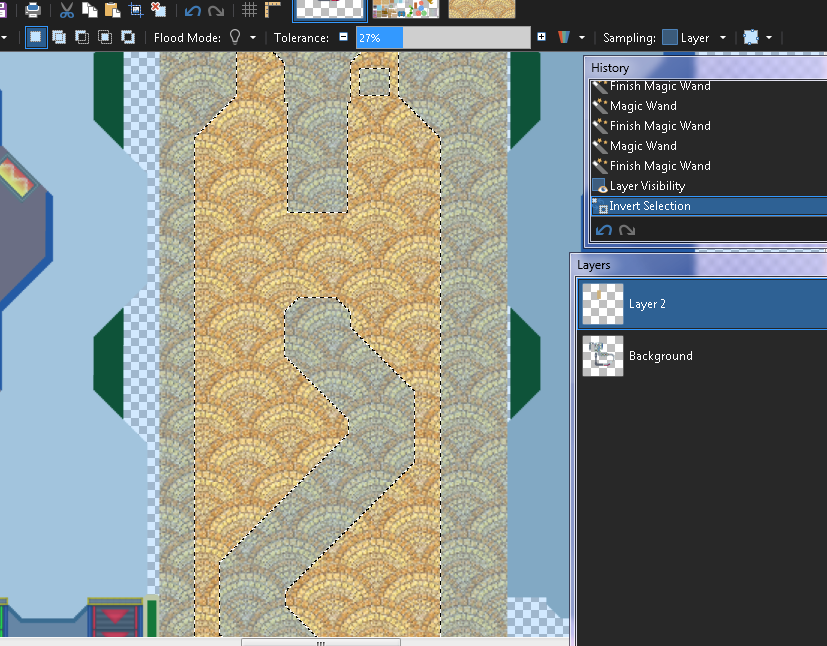
6- Cut that selection using CTRL + X (you can also delete it with eraser tool but with cutting it is a shortcut basically lol)
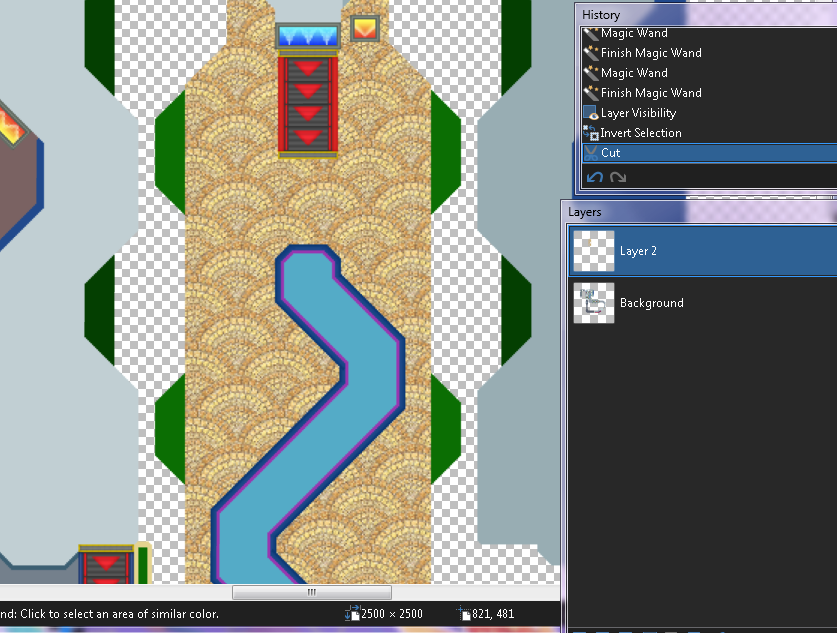
7- Flatten and enjoy :gamba:
Extra: Again, to highlight the details in the texture, you can apply light and constract settings just like in the past method.
Extra II: after you cut the excedent on the texture, you can make that texture gray (just go to adjustments and pick black & withe), go to layer settings and pick overlay blend to get the color that you already have in your track
C- Do it by yourself
The most complicated now we're on the hardest way to do textures and its basically doing them by yourself, there's no much that i could explain because i rarely do a whole track doing textures by myself such as these kind of tiles:
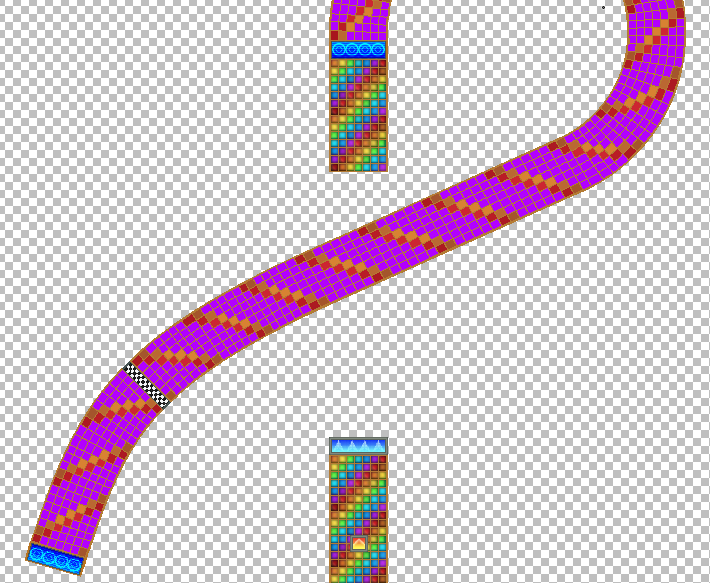
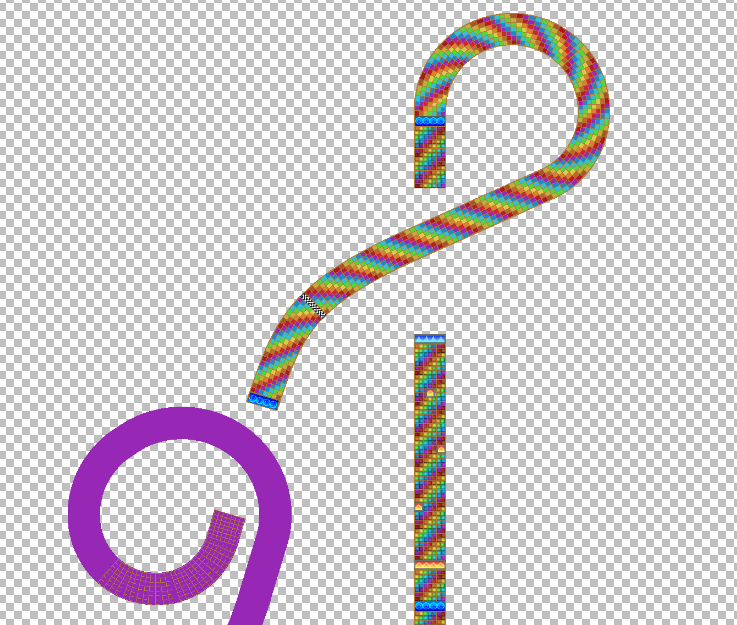
As you can guess... is a headache but it worths.... sometimes
Said that, for another day i'll explain some basic stuff about lightning and shadows and how to do them (a least on my way)so cya fellas.
Meme of 2023
On 2023-10-19 at 13:41:56
He he boi
MKPCC Zombies
On 2024-12-27 at 16:44:53
I will build a great wall between me and zombies and nobody builds walls better than me believe me.
Ideas to optimize (mobile) gameplay
On 2025-04-08 at 19:05:05
Create an online mode where you can choose with or without RD (bcs can't do it on mobile)
Have fun playing solo then because it's unlikely that someone other than you would join.1MKPC Slander
On 2024-01-27 at 10:08:00
